Cost Codes 101: Everything You Need to Know in 2026
Cost codes are the standardized identifiers that let you track exactly where money goes on every job—by task, by trade, by phase. Without them, your job cost reports are just guesswork dressed up as data.


.png)
Contents
This guide covers what cost codes are, how the major systems work, and how to set up a structure that actually gets used consistently across your team.
What are construction cost codes
Cost codes are standardized numerical or alphanumeric identifiers that categorize and track expenses—labor, materials, equipment, subcontractors—for specific tasks or project phases. They create a consistent framework linking your estimates to actual spending, which makes budgeting, financial reporting, and performance analysis accurate and efficient.
Here's the simple version: a cost code is a unique identifier assigned to a specific expense category or task. Every bill, receipt, and labor hour ties back to one of these codes, so you can see exactly where money goes on each project.
Without cost codes, your financials are just a pile of numbers with no story. With them, you have a map showing which parts of a job are profitable and which are bleeding cash.
Work breakdown structure basics
Cost codes fit into a larger framework called a work breakdown structure (WBS). This is a hierarchy that organizes your project from broad categories down to specific tasks.
At the top, you have parent codes—sometimes called divisions—like "Concrete Work" or "Electrical." Under each parent, you have child codes for specific activities: forming, placing, rough-in, trim-out. This hierarchy lets you zoom in or out depending on what you're analyzing.
Want to know total concrete costs? Look at the parent code. Want to know if forming ran over budget? Check the child code.
Phase codes vs line-item codes
Phase codes track broad project stages: pre-construction, foundation, framing, finish. They're useful for high-level progress tracking and draw schedules.
Line-item codes get granular—specific materials, labor tasks, or equipment. These are what you use for detailed job costing and variance analysis.
Most builders use both. Phase codes help you communicate with owners and lenders. Line-item codes help you manage the work internally.
Why cost codes matter for job costing
If you can't see where money goes on each job, you can't control it. Cost codes turn vague expense totals into actionable data—and that's the foundation of construction financial management.
Accurate project cost tracking
Every invoice, timecard, and receipt gets assigned to a specific code. This means you know exactly how much you spent on framing labor versus framing materials versus the framing sub's change order.
Without this granularity, you're guessing. And guessing leads to underbidding future jobs or missing cost overruns until it's too late to fix them.
Real-time budget visibility
Cost codes enable side-by-side comparison of estimated versus actual costs as the project progresses. You set a budget for each code, then track spending against it in real time.
Consistency across jobs and teams
Standardized codes create a common language between field crews, project managers, and accounting. Everyone logs expenses the same way, which eliminates the "what did you mean by that?" conversations that slow everything down.
This consistency also makes historical data useful. When you bid the next job, you can pull actual costs from similar past projects—but only if those costs were coded consistently in the first place.
Types of cost codes in construction
Most builders organize cost codes by expense type. Here's how the main categories break down:
- Labor codes: track crew hours by task or trade (framing labor, finish carpentry, supervision)
- Material codes: track purchases like lumber, concrete, fixtures, and supplies
- Equipment codes: track owned or rented equipment costs, plus fuel and maintenance
- Subcontractor codes: track payments to subs by scope of work
- Overhead and general conditions: track jobsite costs not tied to a specific trade (permits, temporary utilities, dumpsters, site supervision)
Each type serves a different purpose in your reporting. Labor codes help you analyze productivity. Material codes help you spot waste or theft. Subcontractor codes tie directly to your draw requests and lien waiver tracking.
Standard cost code systems for construction
You can build your own system or adopt an industry standard. Standards exist because they create consistency—especially useful when communicating with subs, owners, or lenders who expect a familiar structure.
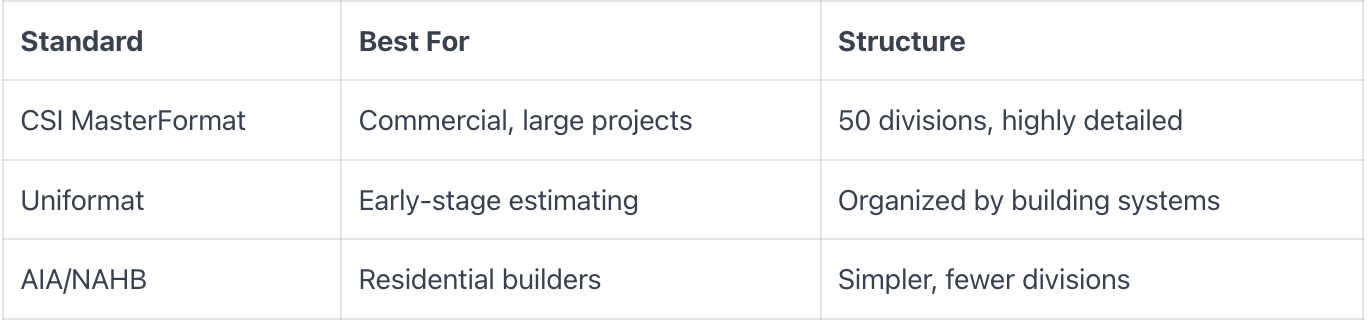
CSI MasterFormat
MasterFormat is the most widely used standard in commercial construction. It organizes costs into 50 divisions—Division 03 for Concrete, Division 09 for Finishes, and so on.
The detail is impressive, but it can be overkill for smaller jobs or residential work. If you're building custom homes, you probably don't need all 50 divisions.
Uniformat
Uniformat groups costs by building systems (substructure, shell, interiors) rather than trades. This makes it useful for early budgeting before design is finalized.
Architects and owners often prefer Uniformat for conceptual estimates because it aligns with how they think about buildings rather than how contractors organize work.
AIA and NAHB standards
AIA and NAHB standards are tailored for residential construction with fewer, simpler categories. If you're a custom home builder or remodeler, they're a solid starting point.
The NAHB chart of accounts, in particular, maps well to how residential builders actually run jobs day to day.
How to choose the right cost code system
The right system depends on your business, not on what looks most sophisticated.
- Project type: commercial work often requires MasterFormat; residential can use simpler systems
- Company size: smaller teams benefit from fewer codes that everyone can remember
- Client requirements: some owners or GCs require specific standards in your pay applications
- Software compatibility: check what your accounting or project management tool supports natively
Don't overcomplicate it. Pick a system you'll actually use consistently. A simple system used well beats a complex system used poorly every time.
How to set up cost codes for your business
Setting up cost codes takes time upfront but saves hours later. Here's the process that works.
1. Define what you need to track
Start with a question: what decisions will you make with this data? If you want to know labor cost per trade, you want trade-level labor codes. If you just want totals by phase, keep it simple.
More codes means more data entry and more chances for miscoding. Only add granularity where it drives better decisions.
2. Choose a standard or build custom codes
Decide whether to adopt CSI MasterFormat, use a residential standard, or create your own hybrid. Custom codes work fine—if you enforce them consistently across every project and every person entering data.
Many builders start with a standard and modify it to fit their work. That's a reasonable approach.
3. Design your numbering structure
Use a logical format that leaves room for expansion. A common structure: XX-XXX, where the first two digits represent the division and the next three represent the line item.
Examples:
- 03-100 = Concrete Forming
- 03-200 = Concrete Placement
- 06-100 = Rough Carpentry
4. Map codes to your chart of accounts
Cost codes in your job costing system want to align with your accounting system. If your QuickBooks chart of accounts uses different categories, create a mapping so data flows cleanly between systems.
This step is where many builders get tripped up. If the mapping is wrong, your job cost reports won't match your financials—and you'll spend hours reconciling.
5. Train your team and enforce consistency
Cost codes only work if everyone uses them the same way. Document your code list with definitions and examples. Train PMs and field staff. Audit entries regularly. When someone codes a bill wrong, fix it immediately and use it as a teaching moment. Consistency is everything.
Construction cost code examples
Here's how cost codes look on a real project:

When a bill arrives for ready-mix concrete, you assign it to 03-200. When you pay the framing crew, those hours go to 06-100. Every expense has a home, and every home tells you something about your job's profitability.
Best practices for managing cost codes
Setting up cost codes is step one. Keeping them useful requires ongoing discipline.
Keep your code list manageable
Too many codes creates confusion. If your team can't remember the codes, they'll guess—and guessing defeats the entire purpose of having a system.
Start lean. Add codes only when you genuinely want more granularity for decision-making.
Review and update quarterly
Retire unused codes. Add new ones as your work evolves. A stale code list leads to miscoding and unreliable data that you can't trust when bidding future work.
Document your system
Create a written cost code dictionary that defines each code with examples. Share it with every new hire and every sub who submits invoices.
Coordinate across field and accounting
Cost codes want to make sense to both the PM entering a bill and the bookkeeper reconciling in QuickBooks. Get both sides in the room when designing or updating your system—otherwise you'll end up with codes that work for one group but confuse the other.
How to automate cost code assignment
Manual cost coding is slow and error-prone. You're chasing receipts, guessing at codes, and re-entering data between systems. It's tedious work that creates bottlenecks.
Modern software changes this picture entirely:
- AI-powered bill processing: reads invoices and suggests the correct job and cost code automatically
- Receipt capture: snap a photo, and the system codes it without manual entry
- Two-way sync: cost code data flows between your job costing tool and QuickBooks in real time
Automation eliminates the bottleneck of manual coding and reduces the errors that come from tired eyes and rushed data entry. Adaptive, for example, reads every bill, matches it to the right job and cost code, routes it for approval, and syncs with your accounting system—so you get real-time visibility without the data entry headache.
FAQs about construction cost codes
How many cost codes should a construction company use?
There's no universal number. Use enough codes to track what matters for your business decisions, but not so many that your team struggles to code consistently. Most residential builders do well with 30-50 codes. Commercial contractors may want 100 or more depending on project complexity.
Can you change cost codes in the middle of a project?
You can, but it creates reporting headaches because historical data won't match going forward. If you change codes mid-project, document the change and map old codes to new ones so your job cost reports stay accurate.
What is the difference between a cost code and a cost category?
A cost category is a broad grouping (like "Labor" or "Materials"). A cost code is a specific identifier within that category (like "Framing Labor" or "Concrete Materials"). Cost codes give you granular tracking; categories give you high-level summaries.
How do cost codes integrate with QuickBooks?
Cost codes in your job costing system map to classes, items, or accounts in QuickBooks. When the systems sync properly, every coded expense flows into QuickBooks under the correct job and category—keeping your books aligned with your project data without manual re-entry.
Track every dollar with automated job costing
Manual cost coding creates stale financials and unreliable job cost reports. By the time you see the numbers, the damage is already done.
Adaptive automates the entire workflow: AI reads every bill, assigns the correct job and cost code, routes it for approval, and syncs with your accounting system in real time. You get accurate job costs without the data entry—and the visibility to catch problems before they eat your margin.
Ready for crystal clear financials without the headache?
Let us show you how Adaptive's AI-powered construction financial management software works in a brief 30 minute demo with someone from our team.